
CHRISTMAS SKIN
Upload a photo and get a festive Minecraft skin: Santa, elf, ugly sweater and more, with your own face.
SIGN IN TO GENERATE
SIGN INDROP PHOTO HERE
OR CLICK TO BROWSE
JPEG · PNG · HEIC · WEBP · UP TO 20 MB
Your face, in a festive Christmas outfit.

MORE ABOUT THIS TOOL
Christmas Minecraft Skin Maker: Your Photo in a Festive Outfit
Get into the holiday spirit in Minecraft. Upload a photo and our AI turns you into a playable Christmas Minecraft skin: your own face and hair, dressed in a festive outfit like a Santa suit, an elf costume or an ugly Christmas sweater. It is a real 64x64 skin, ready in about a minute.
It is the easiest way to get a Christmas skin that actually looks like you, for yourself, for your friends, or as a fun surprise for the whole family's Minecraft characters.
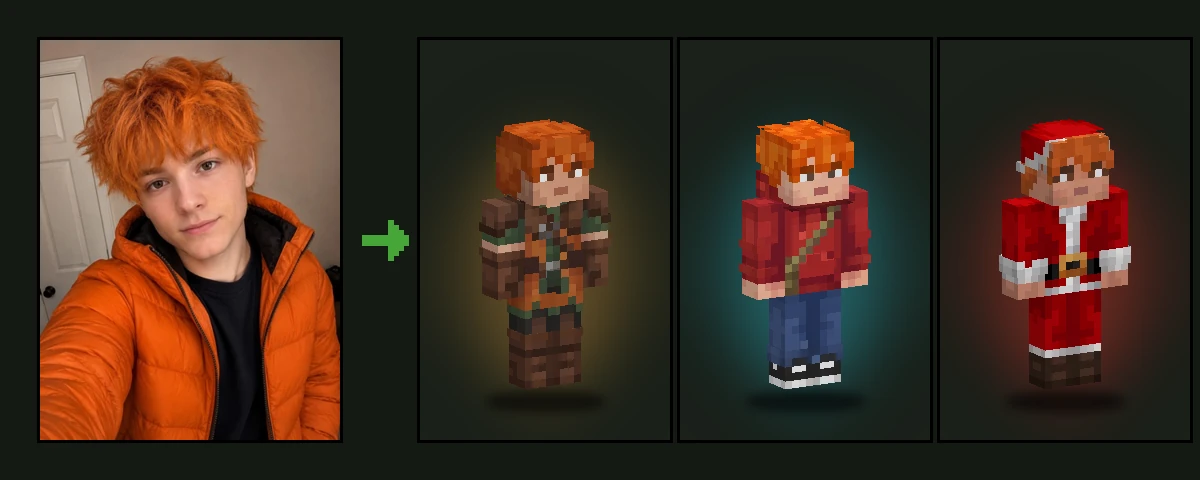
How to Make a Christmas Minecraft Skin from Your Photo
- Upload a clear photo of yourself or someone you want to surprise.
- Keep the Christmas style selected and press Generate.
- Wait about a minute while the AI dresses you up.
- Spin the skin in 3D and download the 64x64 PNG.
- Put it on in Minecraft Java or Bedrock and celebrate in style.
Christmas Outfits the AI Can Make
The AI chooses the festive outfit that suits your photo best:
- Santa suit: red jacket and trousers with white fur trim and a black belt with a gold buckle
- Christmas elf: green tunic, candy-cane striped tights and pointed shoes
- Ugly Christmas sweater: a pixel pattern of snowflakes, reindeer or Christmas trees
- Reindeer hoodie or a gingerbread onesie
- Nutcracker soldier or snowman costume
- Candy-cane pyjamas or cosy winter clothes with a scarf and mittens
A Santa hat, an elf hat or a bobble beanie may sit on top, but your hair stays visible underneath. Your face is always your own: no fake beard over it and nothing covering your eyes or mouth.
Festive Colours, Real Minecraft Pixels
Christmas red, pine green, snow white and gold, with a touch of gingerbread brown. The outfit is drawn in clean, readable blocks of colour with soft shading, so it looks great up close and from across a snowy server spawn.
Christmas Inside Minecraft
Minecraft has its own little Christmas tradition. Since Java Edition 1.4.6, released for Christmas 2012, every chest in Java Edition turns into a wrapped present from December 24 to 26, and the title screen wishes you a "Merry X-mas!". A festive skin is the perfect match for it.
Winter builds make the rest of the scene: snowy villages, igloos, and snow golems built from two snow blocks and a carved pumpkin. Dress up, gather everyone in front of a decorated tree and take a group screenshot for a Minecraft Christmas card.
- December 24 to 26: chests look like wrapped presents in Java Edition
- Snowy biomes: snow, ice, igloos and snowy villages for a winter backdrop
- Snow golems: two snow blocks and a carved pumpkin make a festive helper
- Group screenshot: one Christmas skin per person makes a perfect family card
Best Photos for a Christmas Skin
- A clear, front-facing photo with good light on the face
- Your hairstyle visible
- One person per photo: make one skin each for the whole family
- Any clothes: the outfit is replaced with a Christmas one
Wear It in Minecraft Java and Bedrock
Your Christmas skin downloads as a standard 64x64 PNG for Minecraft Java Edition and Bedrock Edition. Want a different colour or an extra detail, like a present or a bell? Add it in the free Minecraft skin editor. Here is how to import a custom skin into Minecraft.
Photo2Skin is an independent fan tool and is not affiliated with Mojang Studios or Microsoft.
Frequently Asked Questions
Can I make a Christmas Minecraft skin from my photo?
+
Yes. Upload a photo, keep the Christmas style selected and the AI makes a playable Minecraft skin with your face in a festive outfit.
Can I choose Santa, elf or sweater?
+
The AI picks the outfit that suits your photo best. Generate again for a different one, or change the details afterwards in the free skin editor.
Will the skin still look like me?
+
Yes. Your face, hairstyle and hair colour come from your photo and stay visible, even under a Santa hat.
Can I make Christmas skins for my whole family?
+
Yes. Upload one photo per person and make a skin for each of them, so everyone can play in matching holiday outfits.
Does it work in Minecraft Java and Bedrock?
+
Yes. The skin is a standard 64x64 PNG that works in Java Edition and Bedrock Edition.
Do I need a full-body photo?
+
No. A selfie or a head-and-shoulders photo is enough. The AI designs the whole outfit, from the hat down to the boots.
When do Minecraft chests turn into Christmas presents?
+
In Minecraft Java Edition, chests look like wrapped presents from December 24 to 26 every year, a tradition since version 1.4.6 in 2012.