
IMAGE TO SKIN
Upload an image and get 3 unique Minecraft skins.
SIGN IN TO GENERATE
SIGN INDROP IMAGE HERE
OR CLICK TO BROWSE
PNG / JPG / JPEG / WEBP / UP TO 20 MB
Style
Your photo, as it is.

MORE ABOUT THIS TOOL
Image to Minecraft Skin Generator
Convert an image into a Minecraft skin with AI. Upload digital artwork, an avatar, a game character, a screenshot, a mascot or an AI-generated image and transform it into a Minecraft skin adapted to the correct character format.
Unlike basic image pixelation tools, our generator analyzes the subject, colors, clothing and recognizable character details before recreating them across the Minecraft head, torso, arms and legs.
Convert an Image to a Minecraft Skin Online
A Minecraft skin is not a normal square image. It is a structured texture map with separate areas for every side of the head, body, arms and legs. Each part must be positioned correctly so the finished texture wraps around the Minecraft player model.
Our Image to Minecraft Skin Generator uses AI to interpret your uploaded image and rebuild its most important visual features inside this structure. Instead of simply shrinking the source image, the generator creates a character design intended to work as an actual Minecraft skin.
- Digital artwork and character illustrations
- AI-generated characters
- Game avatars and character screenshots
- Cartoon and anime-inspired artwork
- Mascots and graphic characters
- PNG, JPG, JPEG and WebP images
How to Turn an Image into a Minecraft Skin
- Upload a clear PNG, JPG, JPEG or WebP file from your device.
- Start the AI generation so the tool can analyze the main subject, colors and details.
- Generate a Minecraft skin adapted to the head, torso, arms and legs.
- Review how the generated design looks on the Minecraft character model.
- Edit individual pixels when necessary and download the completed skin.
Why Most Image-to-Minecraft-Skin Tools Produce Bad Results
Many websites described as image-to-Minecraft-skin generators do not actually create a correctly structured Minecraft character. They apply a basic pixelation filter, reduce the uploaded image to a very low resolution and place the resulting pixels over a skin-shaped template.
The example below shows the common result. The original image is recognizable when viewed next to the output, but the generated file is only a roughly pixelated silhouette. It does not properly translate the character into separate Minecraft body parts.
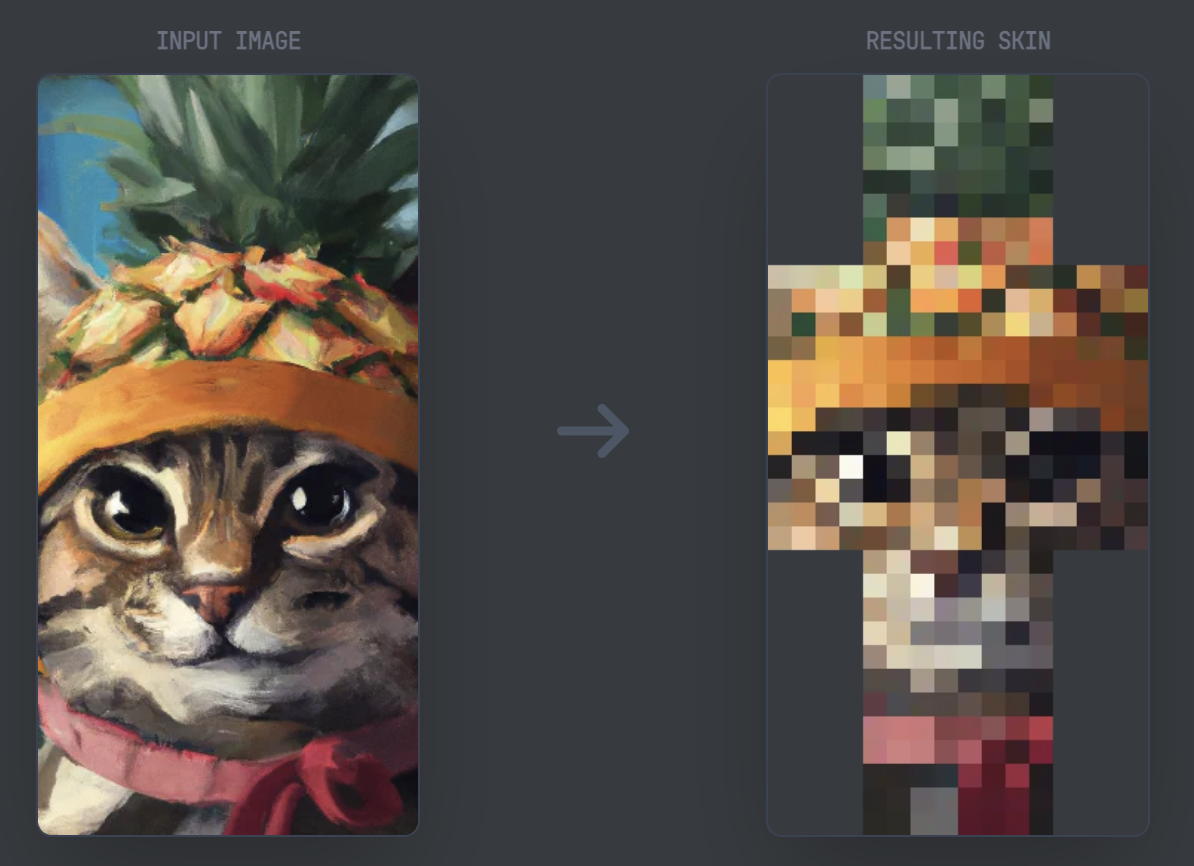
Photo2Skin Image-to-Skin Tool VS Other Tools
| Basic pixelation tool | Our AI image-to-skin tool |
|---|---|
| Shrinks and pixelates the full image | Analyzes the main subject and character details |
| Treats the skin as one flat picture | Adapts the design to separate Minecraft body parts |
| May stretch the image into a human-shaped outline | Recreates the subject as a Minecraft-style character |
| Often ignores side and back textures | Builds a more complete skin layout |
| Produces distorted facial and clothing details | Attempts to preserve recognizable colors and features |
| May only look acceptable as a flat preview | Is designed for use on the Minecraft player model |
How AI Creates a Better Minecraft Skin
Our tool uses AI to interpret the uploaded image before generating the skin. It attempts to identify the main subject and understand which visual elements represent the face, hair, clothing, accessories and overall color scheme.
These details are then reorganized for the Minecraft skin format. The objective is not to copy every original pixel. The objective is to preserve the character appearance while rebuilding it as a usable Minecraft design.
Basic Pixelation vs. AI Skin Generation
| Feature | Pixelation | AI generation |
|---|---|---|
| Understands the subject | No | Yes |
| Recognizes clothing and facial features | No | Yes |
| Adjusts details for Minecraft body parts | No | Yes |
| Creates a structured skin texture | Usually not | Yes |
| Preserves the character concept | Limited | Much better |
| Produces an editable starting point | Poor quality | Yes |
What Images Can Be Converted into Minecraft Skins?
Digital artwork and illustrations
Convert character drawings, concept art and other digital illustrations into Minecraft skins. Artwork with a clearly visible character, defined clothing and strong color separation normally gives the AI the best reference.
AI-generated characters
Upload a character created with an AI image generator and transform it into a Minecraft skin. This allows you to move from a detailed character concept to an editable pixel design without drawing the entire skin manually.
Game avatars and screenshots
A game avatar or character screenshot can be used as visual inspiration. Choose an image where the head, clothing and main color scheme are clearly visible and not hidden by interface elements or other characters.
Cartoon characters and mascots
Cartoon artwork and mascots often work well because they use recognizable shapes and clear colors. Very small details may be simplified to fit the limited Minecraft skin grid.
Logos and graphic designs
Simple graphic designs can be used as inspiration for themed skins. A complex logo cannot always be reproduced exactly across a player model, but its main colors and symbols can be incorporated into the generated character.
How to Get Better Image-to-Skin Results
The quality of the uploaded image affects the quality of the generated Minecraft skin. A clear and well-composed source gives the AI more useful information and normally requires fewer manual corrections.
Use an image with:
- One clearly visible character or main subject
- A simple or uncluttered background
- Good contrast between the subject and background
- Clearly visible clothing, hair and facial features
- Strong colors that can be represented in pixel art
- A front-facing or slightly angled character pose
Avoid images with:
- Several overlapping characters
- Very low resolution or heavy compression
- Blurred facial or clothing details
- Extremely dark lighting
- A complicated background covering the subject
- A tiny character surrounded by large empty areas
- Important parts hidden behind objects or interface elements
Supported Image Formats
| Image format | Best used for |
|---|---|
| PNG | Digital artwork, transparent backgrounds and sharp graphic details |
| JPG | Standard images, screenshots and compressed artwork |
| JPEG | Character images and general visual references |
| WebP | High-quality images with a smaller file size |
Image to Minecraft Skin vs. Photo to Minecraft Skin
An image can be an illustration, screenshot, avatar, logo, game character or AI-generated design. A photo normally refers to a camera image of a real person, object or scene.
| Use Image to Minecraft Skin for | Use Photo to Minecraft Skin for |
|---|---|
| Digital illustrations | Portrait photographs |
| AI-generated characters | Selfies |
| Game avatars | Photos of real people |
| Cartoon artwork | Camera images |
| Mascots and graphic characters | Real-world clothing references |
For a real portrait or selfie, use the Photo to Minecraft Skin Generator .
Edit the Generated Minecraft Skin
AI creates the initial design, but you can still refine the finished result.
Use the 64x64 Minecraft Skin Editor for standard Minecraft skins. For higher-resolution designs, use the 128x128 Minecraft Skin Editor .
Curious how well AI handles images, photos and text? See can AI make Minecraft skins for tested examples.
Frequently Asked Questions
What is an Image to Minecraft Skin Generator?
+
An Image to Minecraft Skin Generator is an AI tool that converts an uploaded image into a Minecraft skin. Instead of manually drawing every pixel, the AI creates a skin based on the colors, shapes and visual features of the original image.
How do I turn an image into a Minecraft skin?
+
Upload your image, let the AI generate the Minecraft skin, review the result, make any edits if needed and download the finished skin for Minecraft.
Does this tool only pixelate my image?
+
No. Basic converters often shrink and pixelate an image without adapting it to the Minecraft skin layout. Our AI analyzes the uploaded image and recreates it as a structured Minecraft character instead of producing a simple pixelated copy.
What image formats are supported?
+
You can upload PNG, JPG, JPEG and WebP images. Clear, high-quality images usually produce the best Minecraft skin results.
Can I convert AI-generated images into Minecraft skins?
+
Yes. AI-generated artwork, digital illustrations, game characters, avatars and other graphics can all be used as source images for generating Minecraft skins.
Can I edit the generated Minecraft skin?
+
Yes. After generation, you can customize the skin using the built-in Minecraft Skin Editor to change colors, adjust pixels and refine individual body parts.
Does the generated skin work in Minecraft Java and Bedrock Edition?
+
The generated skin is compatible with Minecraft skin files. Make sure you choose the correct player model and import the skin according to your Minecraft edition.
Is the Image to Minecraft Skin Generator free?
+
You can upload an image and try the tool from the web app. Each image-to-skin generation uses 2 credits, the same as the Photo to Skin generator.
What types of images work best?
+
Images with one clearly visible subject, good lighting, strong color contrast and minimal background clutter usually generate the most recognizable Minecraft skins.